2026-01-31:
Sleeping Unicorn: 8mm Film.
Rush to buy stocks related to 8mm film!
AI video generation has changed the world. Digital data is fake now.
I assert that in the near future, government CCTV will be replaced with analogue 8mm film cameras.
Do not miss the moment buy immediately it will be too late soon you will regret it.
#deep
#idea
2026-01-27:
Humanity’s Survival
No more other issues left, worrying for humanity surviving.
Stephen H. told us that we need to colonize a second planet, but that dream feels so far away that even S. Hawking got tired of waiting.
Mars colonization is still very distant, and no one knows how long we will have to wait. While rockets are evolving quickly, the progress is not revolutionary enough to make Mars shuttles a common thing anytime soon.
Meanwhile, automation, robots, and AI are undergoing a technological revolution right now.
I’m curious what humanity will achieve first: space shuttles to Mars, or autonomous human cloning farms.
One extra colony is good — but what if humanity starts sending backups of itself before space travel becomes practical?
There’s no need to fly for 10 light-years with thousands of people if you can just send a transport container. It lands by parachute somewhere, expands, and begins printing people.
Or imagine a giant dinosaur hits Earth and kills everyone — but on the Luna, within 15 minutes, humanity begins restoring itself from backup. Once the first group of people is ready, they jump from the Luna back to Earth with parachutes and recolonize the planet.
Recover the civilization, make the Matrix!
#deep
#space
2026-01-13:
White Photodump

#photocard
#photodump
2026-01-08:
Mail catcher
Sometimes you develop. Sometimes you need to send mail. More sometimes (less sometimes?), you need to send mail while you are developing.
Absolutely never should that mail be sent out to the internet. Who would like to receive 50 test emails? All broken.
The safest and simplest way (post your solutions in the comments!) — a mail catcher.
A somewhat fake SMTP server that catches mail, and that’s all.
If you do not like to like yourself, you can use the famous one-liner:
$ python -m smtpd -n -c DebuggingServer localhost:1025
Welp, it works. Thanks!
If you want to have a shared mail catcher for a group of people, there is nothing better than mailtrap.io (there is also mailpit, but you have to self-host it).
But if you want to have it on localhost, then just add this to your docker-compose.yml:
# https://mailpit.axllent.org
smtp-mailpit:
    image: axllent/mailpit
    container_name: smtp-mailpit
    ports:
        #- "1025:1025" # pass through STMP port to host machine
        - "8025:8025" # WEB UI port
    environment:
        MP_SMTP_AUTH_ACCEPT_ANY: 1
        MP_SMTP_AUTH_ALLOW_INSECURE: 1
Than somehow find that your new container in your docker somewhere and use it as SMTP server host:1025 with any credentials, and working TLS.
Add a virtual host if your service check domains validity for some reason.
You already know how to do all of this yourself; I do not want to explain obvious basics to you (I do not know how to).
Then send an email, open that your container UI somehow, and enjoy your local mailtrap mailpit!
Very useful, I like it a lot, highly recommend!
#docker
#mailtpit
#mailtrap
#cool
2025-12-31:
~/.ssh/config and includes
It’s kind of obvious that using .ssh/config separates a skilled Linux user from a wannabe kubuntu user.
And how could it not? You can set the username, port, and key (oh yes, you can use different keys for different services), and all those weird host parameters once and then forget about them.
And aliases:
$ cat ~/.ssh/config
Host ffwe_blog
HostName fire-fart-water-earth.net
IdentityFile ~/.ssh/keys/private_key
User blog
WarnWeakCrypto no
$ ssh ffwe_blog
Typically, after some time, ~/.ssh/config becomes a disgusting list of dead hosts and removed keys. And you can’t really do anything about it. The dual nature of ~/.ssh/config.
But today is a magical day, and I have incredible news for you! ~/.ssh/config supports includes! (did no one read the manual at all?) So you can split your huge garbage pile into neat, organized pillars!
$ cat ~/.ssh/config
SetEnv EDITOR=vim
ServerAliveInterval 30
Include ./conf.d/my_hosts
Include ./conf.d/work_hosts
$ cat ~/.ssh/conf.d/my_hosts

# for syntax highlighting
# vi: ft=sshconfig

Host ffwe_blog
    HostName fire-fart-water-earth.net
    IdentityFile ~/.ssh/keys/private_key
    User blog
    WarnWeakCrypto no
You are welcome! Live better than you lived before!
#ssh
#linux
2025-12-20:
Mozilla's AI curve
2025.02.20: Mozilla diversifies its business through AI products and an online advertising platform
2025.11.16: Firefox is developing a navigation mode that uses AI
2025.12.16: A new head of Mozilla Corporation has been appointed, focusing on AI in Firefox
2025.12.19: Firefox 146.0.1 update: Firefox will introduce an option to completely disable AI
#mozilla
#whathappened
#ai
2025-12-15:
Braille Nubs
Any keyboard has two small nubs (and a third on the numpad) to help you locate C4 by touch.
Not bad. Someone just forgot to tell everyone, but still, not bad.
All the other keys are left smooth, but what if we put Braille nubs on them? (Let’s ignore the insignificant group of people who need more than Latin keys)
We could build our civilization on the common skill of finger reading.
For example, it’s dark in the room. You prob around with your hands and realize -- it’s a light switch! You can summon the light!
Or you’re lying in the dark, finger-reading a book, not afraid that the book will hit you in the face!
Dear gods, we need this urgently!

#deep
#whatif
#idea
2025-12-13:
Terminal shortcuts
The terminal has oddly powerful text-editing features. For example, if you have a string and your cursor is in the middle:
xxx xxx █ xxx xxx
Then you can:
CTRL+W to delete the word on the leftALT+D to delete the word on the right
Why?
#linux
#why
#wtf
#cursed
2025-12-12:
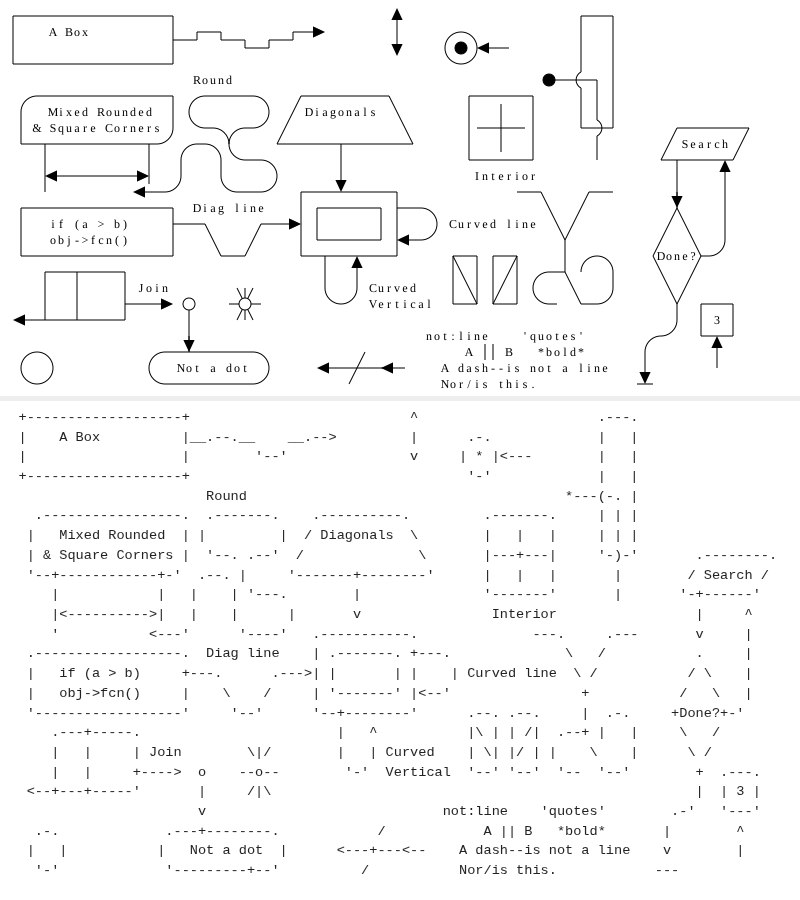
GoAT diagrams
I’ve always been amused by tables in markdown:
| Column 1      | Column 2      |
| ------------- | ------------- |
| Cell 1, Row 1 | Cell 2, Row 1 |
| Cell 1, Row 2 | Cell 1, Row 2 |
It looks really simple and reasonable, and I have no idea how else to make it. But it’s absolutely incomprehensible, unusable, and impossible to make beautiful without a really smart editor.
You can make it ugly and it will still work, but it’s ugly!
But tables are something for the weak and obedient to the gods.
People rebelled, and decided to fully anger the gods, and came up with GoAT diagrams.
Delightfully traumatic. Infinitely cursed.

#cursed
#godslayer
#gods-layer
2025-12-09:
Watchdog and cron
You already know I despise systemd a bit more than wayland, but the future will be in the future, and the past will still be in the past.
I have message queues and bees workers. Workers die each hour, but my lovely cron resurrects them and forces them to work.
It's just a single server and there won't be any more (but there will be fewer), so don't shame me, please.
There are a lot of workers (very few) and even more queues (a very few of few). They lived in harmony, but I did something wrong and the workers began their deadly loop and started eating memory. And they ate it all.
Using simple spells like "it worked before, which means my changes from yesterday are at fault" it was quite simple to find the broken worker. It was killed, and the rest were told to keep working while ignoring the corpse nearby.
And they worked. For an hour. And then they didn’t. Run them manually — works. Leave them alone — doesn’t.
That was weird, as cron wasn't touched, memory wasn’t leaking, but the workers didn’t want to work.
The book of life (/var/log/syslog | grep -i cron) told me that cron worked fine, but not since long ago. And then it didn’t.
It turned out that when the workers ate all the memory — watchdog killed cron. I doubt it realized that cron was the initial culprit; it was simply near the paw of death.
For the very first time in my life, watchdog killed cron! Unbelievable!
Would systemd timers survive? Would the paw of death smite them?
It's a mystery. I could run an experiment, but no. Imperative knowledge is only for people with weak faith.
#linux
#cron
#oom
#outofmemory
#memory
#memoryleak
#loopofdeath
#systemd
#systemdtimers